Networking on LinkedIn for Introverts or Extroverts!
There are many ways to network on LinkedIn whether you are an introvert or an extrovert. However, I will say, that there are a lot of techniques that can feel very ‘icky’ for introverts (people who source their energy and enthusiasm within) and yet they feel perfectly fine for extroverts (people who source their energy and enthusiasm from other people).
This is a very comprehensive article with a range of strategies – so rather than just ‘read through’ all of these, why not give each one a go as you go through?
Some of these suggestions are very gentle and long-term relationship building and others are more career or business aligned.
Ultimately, the goal is to think about who are the people you want to include in your network that are aligned with your purpose!
I believe these skills are more important than ever as a huge proportion of jobs are no longer advertised as recruiters and decision makers cannot cope with the huge influx of AI generated resumes and applications, so if you can be connected to relevant people, you are more likely to appear in a search query in LinkedIn.
If your LinkedIn Profile is fully completed and has recent activity, Skill Endorsements and Written Recommendations, you are also more likely to appear in search results.
I do not recommend networking on LinkedIn if you do not have a fully completed LinkedIn Profile (and yes, I can help you with that!). You don’t want to reach out to someone and then when they look at your LinkedIn Profile, have them be put off by what they see (or don’t see).
Finally, if you can keep yourself ‘in circulation online,’ people are more likely to remember you when an opportunity becomes available! After all, your net-work equals your net-worth.
Who Can You Invite To Connect With You On LinkedIn?
Some of these people could include:
- present and past colleagues
- friends, family and extended family including parents and children of others and close family friends
- neighbours and people you meet via hobbies and interests
- fellow students and alumni from your education and training
- similar professionals with similar expertise
- other people in your industry
- decision makers in enterprises where you would like to work
- decision makers in enterprises that can purchase your goods or services
- thought leaders and influencers that can inform or inspire you
- potential advisors, mentors and advocates who can help you achieve your purpose
- coaches and consultants that are aligned with your purpose
- media representatives who report on topics of interest to you
- academics and subject matter experts in areas of interest to you
- people who are local to your community, country or area of specialisation internationally
- relevant people in local, state and country community and government organisations
- stakeholders, suppliers and referral partners
- random people you meet online or in person, even when travelling
- people who reach out to you via email, text, direct message, phone call etc
- people you meet at events, conferences, workshops, meetings etc
- centres of influence that are well known and are well connected
- people who could represent you including agents, managers etc
- people who engage with content on LinkedIn (either Reactions, Comments or Reposts)
General Principles For Networking On LinkedIn
My three favourite words are ‘FROM NOW ON.’
Personally, I have a policy of connecting with everyone I meet in person or online on LinkedIn until I run out of capacity.
You can have a maximum of 30,000 Connections on LinkedIn and an unlimited number of Followers.
If I connect with someone now and receive an enquiry but not a ‘sale,’ the person can see what I do online and reconsider my offerings at a later point in time.
I also proactively connect with people who are directly related to the professional associations I am a member of as I like to actively support these enterprises.
Likewise, when someone asks me to connect with them on LinkedIn, my personal policy is to say ‘yes’ if they are also based in Australia (unless I think they will push their goods or services on to me) and if they are based overseas, we need to have a common interest.
However, when I am helping my students and clients, I encourage people to actively network and reach out to other people as well – so here are the various ways you can network online to find and connect with the people who matter to you!
Please note, I do not recommend sending more than 100 requests to connect per week.
Networking On LinkedIn
1. Click On The My Network Tab
The Network Tab across the top of your screen will show you ‘People you may know’ – and you can easily scroll through these and choose ‘Connect’ and you can even send the Connection request without a ‘note’ attached (as various LinkedIn Experts have tested to see if it makes a significant difference to acceptance rates and apparently it doesn’t – in fact in some instances, they found that including a message reduced acceptance rates).
2. Download Your Data For A Mind Prompt
I recommend that you download your LinkedIn data at least every six months and request a full data archive, at https://www.linkedin.com/mypreferences/d/download-my-data. When you receive the two emails from LinkedIn, each with a link, make sure you click the link and save the Zip files immediately as the link will expire.
In the second email, one of the files in the Zip file will be a list of your LinkedIn Connections – first name, last name, current job title, current company name and date you connected. As you scroll through this list, you can either re-connect with someone you already know or be prompted to think of someone else you remember after seeing a name or company name in the file.
3. See Who Has Viewed Your LinkedIn Profile
People who have recently looked at your LinkedIn Profile are listed at https://www.linkedin.com/analytics/profile-views and these people are already ‘interested’ in what you have to offer. With a free LinkedIn account, you can see the last five people who have looked at you if you have your setting here https://www.linkedin.com/mypreferences/d/profile-viewing-options as your name and profile. If you have a LinkedIn Premium Profile (even the most basic Jobs and Careers one), you will be able to see the last 90 days of people who have looked at your LinkedIn Profile.
4. See Who Has Interacted With Your Posts In The Newsfeed
Whether someone has ‘Liked’ your posts (a reaction) or added a ‘Comment’ or reposted your content, this shows that they value your content at some level. If these people could be on your ‘target list’ related to your purpose, you can reach out with an invitation to connect.
5. Follow Selected Company Pages And Click The Notification Bell
Ideally, I recommend that you Follow the Company or School Page of every past, current or potential future Employer and if their content is potentially of interest, click the Notification Bell and choose ‘All Posts.’ This will curate your Newsfeed so that you are more likely to see content that is of interest to you. Now that this content is in your Newsfeed (or if you visit the Company or School Page you can see their recent Posts there), you can see who has Reacted to or Commented on the Posts and consider inviting these people to connect.
6. Follow And Review The Company Or School Pages Of Professional Associations
Whether you are a financial member or not, visit the Company or School Pages of Professional or Industry Associations and view their content and see who has Reacted to or Commented on the Posts there and consider inviting these people to connect as these people are ‘active’ on LinkedIn. Likewise, visit the website of these Associations and if there is a Member Directory, you may like to invite some of the Members related to your purpose to connect on LinkedIn.
7. Connect Via Education Providers
If you studied at a particular Education Provider and have listed that in the Education section of your LinkedIn Profile and chosen them from the drop down box, you will be identified as an ‘Alumni’ of that institutional ‘School’ page on LinkedIn. If you visit their LinkedIn School Page, you can look at the other alumni listed there and reach out where appropriate. You can also press the Notification Bell and ‘All posts’ to curate your Newsfeed.
8. Target Specific Individuals Via A Google Advanced Search
If you search for someone on LinkedIn, your search query will be based on LinkedIn’s algorithms (and some people may be completely outside of your individual LinkedIn Connections). If you do a Google Advanced Search, you can search for specific words anywhere on LinkedIn.com using a Boolean Search. For example, you can search for “Senior Project Manager” and “construction” and “Melbourne” to find someone who has all of these words on their LinkedIn Profile and then reach out and connect. Consider looking at the list of ‘people you can invite to connect’ above to take full advantage of this unlimited free search opportunity.
9. Target Related Individuals Listed On A LinkedIn Profile
When you look at someone’s LinkedIn Profile (whether they are connected or not), you can usually see their recent Posts, Articles, Skill Endorsements and Written Recommendations and people who have engaged with this person’s content or profile are likely to be ‘supportive’ of that person and may be open to a Connection request if you share similar interests or have a similar purpose.
10. Use Google Maps To Find Relevant Enterprises
I am a huge fan of working-close-to-home and also doing-business-close-to-home. So if you have some time, deep dive into Google Maps and look for enterprises that are within a reasonable radius of where you live or work or can easily access via public transport and then Follow the Company Page and then dive deeper through their content and see who reacts and comments on it from there.
11. Visit Company Website About Us Pages
You can often find a list of Senior Professionals and Board Directors at an enterprise on the Company Website and then you can look for these people on LinkedIn. Be warned that People and Culture or Human Resources Managers are often not involved in the recruitment process and often reject invitations from potential employees. You need to find the people responsible for talent selection and this can still be a bit hit or miss. If you happen to already know someone who works there, definitely connect with them!
12. Follow The Experts And Influencers
Think of anybody that you either know or would like to know that are the experts and influencers in your profession or industry. These people are often well connected (for example, media journalists need reliable sources to quote and they need an engaged audience too). Then once again, invite these people to connect and see who reacts and comments on their content and consider adding in solution-focused comments yourself as sometimes Comments travel further than Posts! You may also like to click the Notification Bell on these individuals so you are more likely to see their content in your Newsfeed and if you regularly react and comment on their content (engage), they may reach out to you in the future.
13. Consider Searching Via Hashtags
Even though hashtags are not as popular as they once were, some people still use them in their Posts and you can find content around these on LinkedIn via the Search box on the top of your screen and then target people who have either published the Post or reacted to or commented on the posts.
14. Consider Searching Via Groups, Events, Pages or Newsletters
The Groups, Events, Pages or Newsletters that you have engaged with previously are listed on the top left hand side of your Network page at https://www.linkedin.com/mynetwork/grow/ and these can also be a source of related connection requests. Personally, if I have registered to attend an event, I usually invite the Speaker/s to connect with me (and I have a high acceptance rate). Remember that speakers are often well connected too. Likewise, you may want to look up new Groups, Events, Pages or Newsletters and find new leads there.
15. Review Your Followers
If you are the Administrator of a Company Page, you will be able to see the people who Follow the Company Page. Likewise, some people may have Followed your Profile but are not Connected with you (especially if you have the Follow rather than Connect button turned on for your LinkedIn Profile). I have found some great connections from my list of Followers at https://www.linkedin.com/mynetwork/network-manager/people-follow/followers
16. Target Selected Recruiters and Head Hunters
This is particularly relevant for people looking for work. Look up any jobs that are being advertised online (on LinkedIn or elsewhere) and look at the names of the individual recruiters or the recruitment companies going through the selection process. I recommend that you aim for individual recruiters or head hunters who have been in a recruitment role for at least three years and definitely if they specialise in your area of expertise. For example, if you are a software developer and the recruiter specialises in software development roles, then they are likely to have their own ‘gene pool’ of possible candidates on standby when a new software developer role becomes available. However, remember that these people represent the enterprise, not you as a candidate as you are not paying for their assistance and they will only be paid if you are placed in a role.
17. Look At Your Top Performing Posts
You can see these details for the last 12 months online at https://www.linkedin.com/analytics/creator/content/ and you might be able to revisit some of your past content that has been successful and re-engage with people who have reacted to or commented on it. You may even find some people who have regularly engaged but are not connected yet!
18. Utilise Online and Artificial Intelligence AI Queries
You can still do online and AI search queries to find specific people. Help the bot out by providing a comprehensive context specific prompt query. For example, I am a mid career professional in the area of project management in the construction industry and I am looking for information and referrals from people in the industry who may be able to refer me into a role within their enterprise. Can you please prepare an outreach list of organisations that I can reach out to here in Melbourne and any names if you have some available?
19. Revisit Your Messaging Inbox
Perhaps you corresponded with a recruiter a few years ago and they could benefit from an update about your current situation. Or maybe, the person you met on that long haul aircraft flight seemed to know ‘everyone’ and may be worth reaching out to. Going through your past messages may remind you to reconnect with someone who you have already spoken to previously – and remember, you are asking for information or a referral, not a direct offer!
20. Look Up Relevant Publications Or Databases
These could be printed Journals, Magazines, Annual Reports, White Papers, Academic Papers, Opinion Editorial pieces in mainstream newspapers or Research Databases. You can look at the publication to find who wrote an individual piece of content related to your purpose or who was featured in the content and then you could reach out to connect. Maybe there is a relevant podcast or television program for your profession or industry and you could reach out to the presenters, broadcasters, producers or guests. If you mention how you found the person after you have connected, they may be very impressed by your detective skills!
21. Look For People With Similar Job Titles
It may seem counterintuitive to reach out and connect with people who have a similar job title, but these people are likely to know other people with a similar job title who are either ready to move on or know what is happening in the profession or industry. Focus on people in your desired work or business location. Databases like LinkedIn are happy to see you connected with other people from the same profession or industry because it helps the database work out where to recommend you.
22. Look For People With Similar Names
I have had a lot of fun connecting with other people called Sue or Susan Ellson around the world! Why not I say – makes for a good story!
23. Keep Networking
It can be very tempting to only network when you ‘need something.’ This is the wrong way to network. You need to continually build your network over time and if you publish something small (which can simply be a repost) just once a month, you will remain ‘in circulation.’
However, if even that doesn’t feel very comfortable, you can always just engage with existing content (Likes and Comments). I also recommend that if you go to an in person event, you always aim to connect with at least three people using the Scan Code feature on the LinkedIn App (it is a great icebreaker and means that you can move on from talking to one person for the entire occasion because you are on a mission to reach three people and you can even tell them why you are moving on).
24. Be Aware Of Conflicts Of Interest
Unfortunately, I have seen some people looking for work go to a free career service supported by an academic institution and their number one recommendation is to ‘do another course!’ Likewise, some recruiters will convince you to stay in a role for three months so that they can collect their commission and secure another round of funding to replace you when you leave.
Well-meaning friends and family may have the skills to do a job but they don’t always have the skills to find work (which is a different skill set). Not everything that is ‘free’ has value.
If you receive professional assistance and start a new role, with the right remuneration just one week before another role you get without the support, then the professional service will have been worth your investment. If you are looking for a LinkedIn Specialist, I recommend that you go through this assessment process first before booking an appointment.
25. Consider Giving Skill Endorsements and Writing Recommendations
Whenever you give someone you are connected to an endorsement (vote) for one of their Skills or you write a Recommendation for them, it will send the person a Notification. This will bump you up the ‘memory recall’ line of the person and most people appreciate this generous gesture.
26. Consider A Collaboration
Perhaps you would like to work collaboratively with someone to publish a Post or an Article on a Company or School Page? This helps develop your existing relationships and could lead to further introductions during the collaboration process.
27. Be Aware Of New LinkedIn Features
LinkedIn is continually changing and offering new features. At present, short form portrait video content, one question polls and uploaded PDF documents (with interesting content) are performing quite well. Anything that keeps more people on LinkedIn for longer and stops them scrolling and gets them engaging is likely to do well. If you become an ‘early adopter’ of new features, they are often promoted on a higher rotation when they first arrive. However, I have found that over time, the best results come from consistently showing up on a regular basis (but not too regular – maximum of three times a week) with friendly, professional and solution-focused content works well.
28. Look At Your Contemporaries And Competitors
Whilst you may choose not to connect with your fellow contemporaries or competitors in the profession or industry where you are based, looking at their LinkedIn Profiles and activity could prompt you to reach out to someone relevant to your purpose. Remember that every profession and industry is always changing and moves happen, so it is best to remain polite and professional at all times. I have developed many excellent relationships with other people with similar skill sets.
29. Reach Out To A Career Development Or Outplacement Professional
Whilst recruiters represent enterprises, professionals in the areas of Career Development or Outplacement (like me) can provide very specific networking suggestions and individual people you could reach out to, particularly if they have a background in a similar profession or industry. These people are often very well connected due to the nature of their work and although you (or your previous employer) are paying for their services, they can be extremely helpful at going ‘straight to the source’ and they often already have a relationship with the referees they recommend.
For one of my clients, I helped them target a very specific type of individual in a very large consulting firm and after a very good in person meeting, he went straight to final stage interview and got the job even though he didn’t have any Australian experience or the relevant formal qualification!
30. Keep Your Personalised LinkedIn URL and QR Code Out There
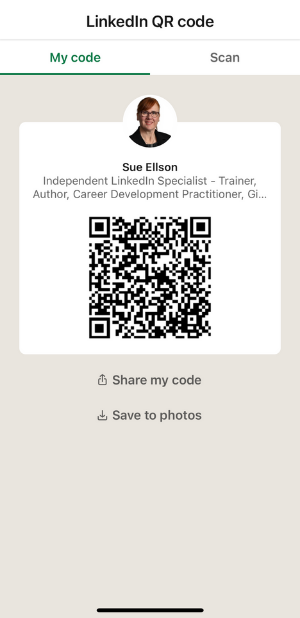
Add your personalised LinkedIn URL and/or your LinkedIn QR Code (available in the LinkedIn App) to your email signature, your business card, your resume, your job applications, your work proposals or even your group presentations and invite people to Connect with you. If anyone becomes a nuisance, simply visit their LinkedIn Profile and Remove the Connection and/or Block them.
How To Find The Connect Button On A LinkedIn Profile
If you can only see a ‘Follow’ button on someone’s LinkedIn Profile, you can usually see a ‘Connect’ option if you click on another part of the LinkedIn Profile near the top of the screen. It will either be three dots … or a More button or a Resources button. You can either choose ‘Connect’ or ‘Personalize invite’ if you would like to add a note.
What To Do After You Have Connected With Someone
I recommend that you periodically check the Network tab and look at your current list of Connections https://www.linkedin.com/mynetwork/invite-connect/connections.
For any of the ‘new’ people that are now in your network, you may like to follow up with something of value. You could say thank you for accepting the connection request and share something relevant to that person – a comment on why you reached out, a digital PDF file that may be helpful to them, a link to something interesting to them etc – something aligned with your purpose and something useful for the person.
However, it is inappropriate to ‘connect and pitch.’ To immediately make a request. Read the Professional Community Policies and the LinkedIn User Agreement Section 8 Do’s and Don’ts to ensure you don’t lose your LinkedIn Profile because you have done something outside of the LinkedIn rules.
If you are looking for work, you could explain your current situation and ask for any information they could share that could be helpful with your search. This could be a chance to have a brief online meeting or telephone call or a coffee meeting to find out further information or the details of someone they would recommend that you speak to (ideally asking for information or a referral).
If you are looking for a business opportunity, please lead with something of genuine value to them and offer to contact them again in a couple of weeks. Then offer something else of value two weeks later as well. Then two weeks later again, if they have still not responded, you can invite them to reach out to you if they have any questions or would like further information and then pause.
One of my clients created a spreadsheet with a list of first name, last name, job title, company name and LinkedIn URL for each person they reached out to and then had columns to add in the reason for connecting, the date of the first approach, the date they confirmed the connection, the date for messages one, two and three that were sent and a details column for any other comments. Naturally, this could also be done in a Customer Relationship Management System.
Remember that it is against the LinkedIn User Agreement to use a third party tool to automate this process, but systemising your approach on a manual basis is okay. Again, I would not recommend more than 100 outreaches per week and you need to remember that a lot of people do not check LinkedIn every day so some connection requests or messages may not be seen for days, weeks or months, so make sure you have realistic expectations.
AI was NOT used to create this content.
Other Articles and Presentations
Authentic Networking on LinkedIn
https://www.linkedin.com/pulse/20140407042716-77832–authentic-networking-on-linkedin
10 Ways to Improve your LinkedIn Networking – slides and video recording
https://sueellson.com/blog/10-ways-to-improve-your-linkedin-networking
10 Ways to Improve your LinkedIn Research – slides and video recording
https://sueellson.com/blog/10-ways-to-improve-your-linkedin-research
Networking – Free and Paid Online and Offline – What really works?
https://www.linkedin.com/pulse/networking-free-paid-online-offline-what-really-works-sue-ellson
How To Run Successful Networking Events
https://sueellson.com/blog/how-to-run-successful-networking-events
LinkedIn Online Course
You may also be interested in the course ‘LinkedIn for me and my career or business‘ which includes a copy of my book!
One-on-One Consultation
Book a One-on-One Consultation
Other Recommendations
Free Webinars and Recordings
https://sueellson.com/webinars-and-recordings
There are a lot of other Publications and Presentations on my website that may be of interest to you – or check out my Poems here. I have plenty of suggestions on how to use LinkedIn for your purpose and how you can optimise your LinkedIn strategy and tactics and my books talk about this process as well. Just contact me for more assistance.
Shared online Archive.org, Publications 2026, Facebook, Google, LinkedIn Page, LinkedIn Profile, Reddit, Substack, Twitter / X